Ephinea PSO BB natively on Android via Winlator

Thank you, this helped me. I followed your setup exactly, the only thing that's different for me is that I'm on the latest turnip driver as the version you recommend is no longer selectable in the dropdown list. The weird thing is, I can only actually get into game like 1 in 20 times. The most common issue I'm experiencing is that the launcher is unresponsive meaning that I'm unable to click on anything. Sometimes the launcher doesn't appear at all. I'm using a Redmagic 10 Pro (Snapdragon 8 Elite).

The other issue I found in game is that the enter button on the Android keyboard doesn't work (meaning that I'm unable to create a room).

Do you have any ideas on how to fix either of these issues? I've tried fiddling around with the settings but nothing I've tried seems to make a difference.
It's been a while since I've tinkered around with this, but here are some things I changed

Client
  • Gamehub Lite 5.1.4
Container Settings:
  • Driver: Turnip v26.1.0-R4
  • DXVK: dxvk-1.10.3-arm64ec-async
  • CPU Translator: Fex-20260103
Game Settings:
  • Graphics API: Vulkan
Components:
  • vcredist2022
  • mono-10.3.0
  • gecko
Regarding your issues:
Issue A): Try installing gecko and mono in your container and don't forget to set Windows 7 as the OS within Wine Configuration

Issue B): The only way around this issue I found was to either A) use a hardware keyboard like a bluetooth keyboard or B) Switch the Touch control layout to "Default Keyboard and Mouse Layout" and hit enter from there

NOTE: I do experience some amount of crashing/freezing while in-game, so beware of that
 
Any support for gamenative? I'm on an AYN Odin 3. I can open the online.exe but nothing else :(
I was only able to get it to run on Gamehub and its forks.

While I did get the game to launch properly and enter the initial connection screen, Gamenative and Winlator (and its forks) both gave me Error916 on the same installation that worked with GH/GHL. I also tried to switch the container type to glibc in gamenative, but that didn't work either.
 
Has anyone got this running on a non Snapdragon device? Trying to run this on my RG 477M but the closest i’ve gotten is on Star Bionic. was able to load in but keep getting Error 916
 
I was only able to get it to run on Gamehub and its forks.

While I did get the game to launch properly and enter the initial connection screen, Gamenative and Winlator (and its forks) both gave me Error916 on the same installation that worked with GH/GHL. I also tried to switch the container type to glibc in gamenative, but that didn't work either.

Has anyone got this running on a non Snapdragon device? Trying to run this on my RG 477M but the closest i’ve gotten is on Star Bionic. was able to load in but keep getting Error 916


After the update most Winlator versions do not work, but some do.

Post in thread 'Cannot connect after updates.' https://www.pioneer2.net/community/threads/cannot-connect-after-updates.33036/post-251378

I did some tests and posted them here.

Hope it helps.
 
Has anyone got this running on a non Snapdragon device? Trying to run this on my RG 477M but the closest i’ve gotten is on Star Bionic. was able to load in but keep getting Error 916
I'm working on getting this to run on my RG406V, so if you get something running please lemme know. I will do the same vice versa
 
i just got this running today on Winlator 11, but I am having the same issue of the keyboard Enter and Delete keys are not working, which means you cant ever start a party.
Also, the launcher freezes whenever I try to select a dropdown, so I cant change the resolution or change it off windowed mode. Are there any workarounds for this?
 
Has anyone got this running on a non Snapdragon device? Trying to run this on my RG 477M but the closest i’ve gotten is on Star Bionic. was able to load in but keep getting Error 916
I am currently trying to run it on my new Galaxy Tab S11 Ultra (running on Mediatek Dimensity 9400+)

It seems out of question using regular Winlator or Gamehub, because Mali GPU are not supported for anything higher than Directx 9.

But I found out there is a fork of Winlator for Mali: https://github.com/GunaCharanTeja/WinlatorMali

For now, I'm not having much success.
Installed vs2005-2022, gecko, and mono.

But have no success yet opening the launcher.
I can boot PSO, but it will freeze on a black screen after pressing Start and then crashing Winlator.
 
Yo,

So I wanted to sum up my experience on how to run the game on Android via Winlator. I also tried Mobox, but honestly it is much more complicated and kinda waste of time for the same end result.

I found out during my expérimentation some people were running it successfully on Samsung Galaxy phones and some Android handhelds without headache, I don't think they are on Qualcomm SOC.
By the way, someone made an automated script for the ones who would like to install and minimal setup it easily:
In my case, using an Xperia 1V with a Snapdragon 8 Gen 2, as well as another old crappy Snapdragon 695 I use for random tests purpose or spare at home.
Impossible to boot psobb process, whatever all combinations of resolution, graphics API, box86/64 settings on both phones.
Which was odd because on the Xperia the same wine container can run Yakuza 0 for instance.

The only error log obtained was:

Since nothing was hooking the process, it actually turns out the problem was the versions of box86 and 64 set by default within Winlator settings itself.
Once switched more recent box68 to 0.3.5 et box64 to 0.2.7, PSO magically booted, with any graphics API. :)
Dualsense connected on Bluetooth is also working.

Here is my working settings, I think there is margin to try various ones, as well as PSO ones, to get better performance:
View attachment 22190
In Wine configuration under start menu, you will need to add Ephinea dll into libraries tab as native, or else it won't be loaded into the client.
If you are on an Xperia, I recommand using Game enhencer and enable HS power control to block battery charging while playing on AC.

I would add a side note for login entry, it can be tricky to validate as the virtual enter key on the on screen RTS is sometimes not validating and you are stuck in text edit of your username or password.
At login screen don't do anything and enable RTS as well as "lock cursor" (back button, input controls). Lock cursor will disable mouse pointer control.
Enter your login and pass using native Android keyboard, but don't press the enter key on it, instead close it and use the virtual enter key of the on screen RTS.

Also, I would recommand copying your already updated client from your PC directly on your phone instead of letting it update itself as it not seems to work greatly when psobb process write files and you will end up into the loop of the login that is never saved.
I've been dying to play BB on Android I wonder if I can download straight from the forum instead of using my PC to pass over the installed files D: and could I do that through a windows or mac PC ? I installed winlator but I'm pretty lost on how it's done
#Cheers
 
I've been dying to play BB on Android I wonder if I can download straight from the forum instead of using my PC to pass over the installed files D: and could I do that through a windows or mac PC ? I installed winlator but I'm pretty lost on how it's done
#Cheers
The less unneeded complicated operations you do with winlator, the less you are exposing yourself to random problems.

The main issues are having network actually working and the launcher opening.
 
anyone make any progress on this? i recently got and AYN Thor, id love to play it on this but it is android. obviously you can use the moonlight and sunshine apps but its not quite as good of an experience as playing it directly on the device
 
I got this working this evening on a Xiaomi Pad Mini with Winlator. Unfortunately has a slow frame rate, but I played through the first level ok.
 
I'm hoping to come to beg for help because I haven't had much luck getting this working on my device.

Its a Samsung Galaxy Z Fold 8 Ultra. So it's a Snapdragon 8 Elite Gen 5 with an Adreno 840.

With Winlator 10.0 I managed to get the game to run and login but performance from some shaders was truly awful, I had to use the VirGL driver to get it running and never got it working with any Adreno/Turnip driver.

With a fresh setup on Winlator 11.1 I could get the game running with an Adreno driver and great performance but get the server full (916? I think it is) on every login.

I'd love to be able to get it working with GameNative since that would be nicest but I haven't managed to get it to start AT ALL (game nor launcher) with GameNative. The logs revealed it has some missing fonts, so I guess GameNative doesn't install as much on the base image of Winlator as native Winlator.

Has anyone had some success and a combination that works on an 8 Elite device? I'm losing my mind and I've spent several hours trying to find combinations that would work.
 
anyone make any progress on this? i recently got and AYN Thor, id love to play it on this but it is android. obviously you can use the moonlight and sunshine apps but its not quite as good of an experience as playing it directly on the device
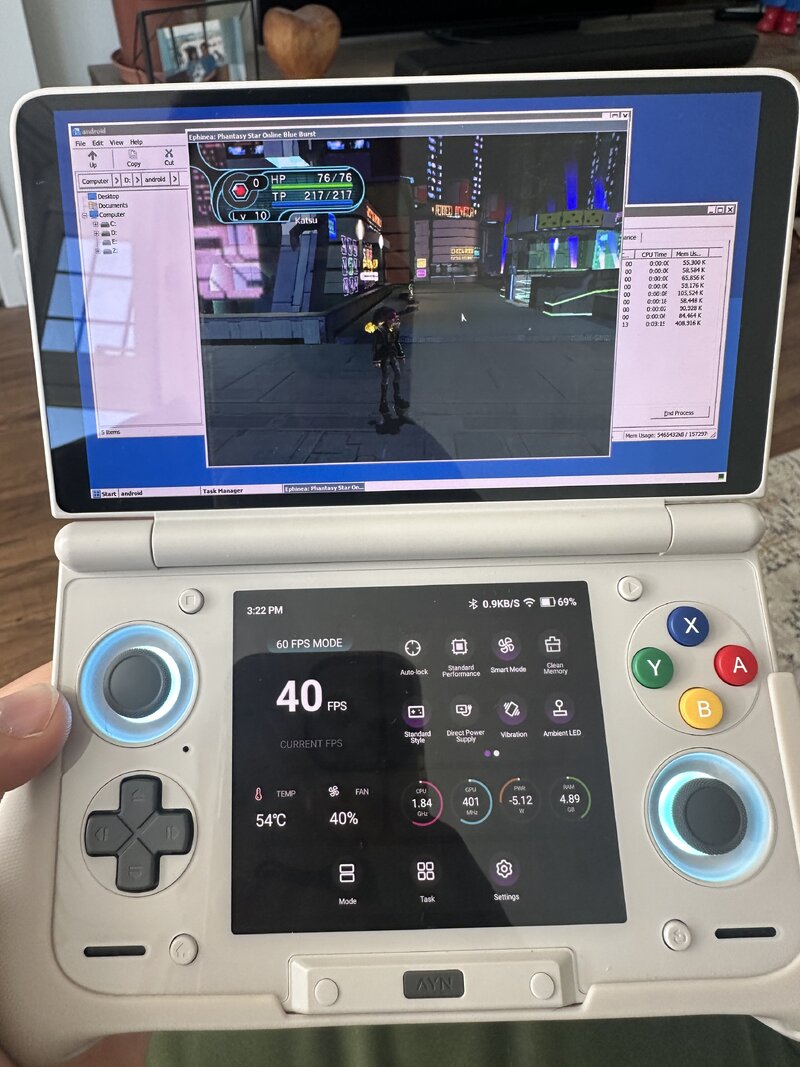
I received my Thor this week and installing ephinea is my last bit of tinkering that I planned on. After days of messing with winlator and everything mentioned in this guide, I came across crashes and the 916 error constantly along with several other annoying bugs. Tried several versions of winlator and even gave it a try on gamenative. Nearly gave up. But then I figured it was worth following the reddit post about installing it on their Retroid to the exact detail, and that meant installing specifically v10.0 of winlator and not just the latest one.

Happy to say that I'm amazed that its worked! Basically, if you have obtainium on your Thor then use it to get winlator, but instead of tapping install, follow the GitHub link and download the v10.0 release.
- Change Vortek(universal) to Turnip(adreno)
- Use DXVK
- WINEESYNC = off
And that's all the tweaking I did in the container. Then did the usual. Opened the container, installed mono and gecko. Installed ephinea. Open launcher, update, change settings (only kept it at DX9 for now) and left it windowed whilst trying to get it to work.

I was shocked that it seemed so easy. Hopefully this works for others, but regular winlator v10.0 did it for me!

Now to get it tweaked so the controllers, keyboard, graphics and launcher work seamlessly. If anyone following this is interested I will post again once I have got it how I want it.

Edit: it's worth noting that I had to use a bluetooth keyboard to type anything. And the controls are also a real mess right now so need to work out how to best map the controls to client (R3 is currently the main menu which took me too long to find)
 

Attachments

  • IMG_6232.JPG
    IMG_6232.JPG
    1.3 MB · Views: 4
Last edited:
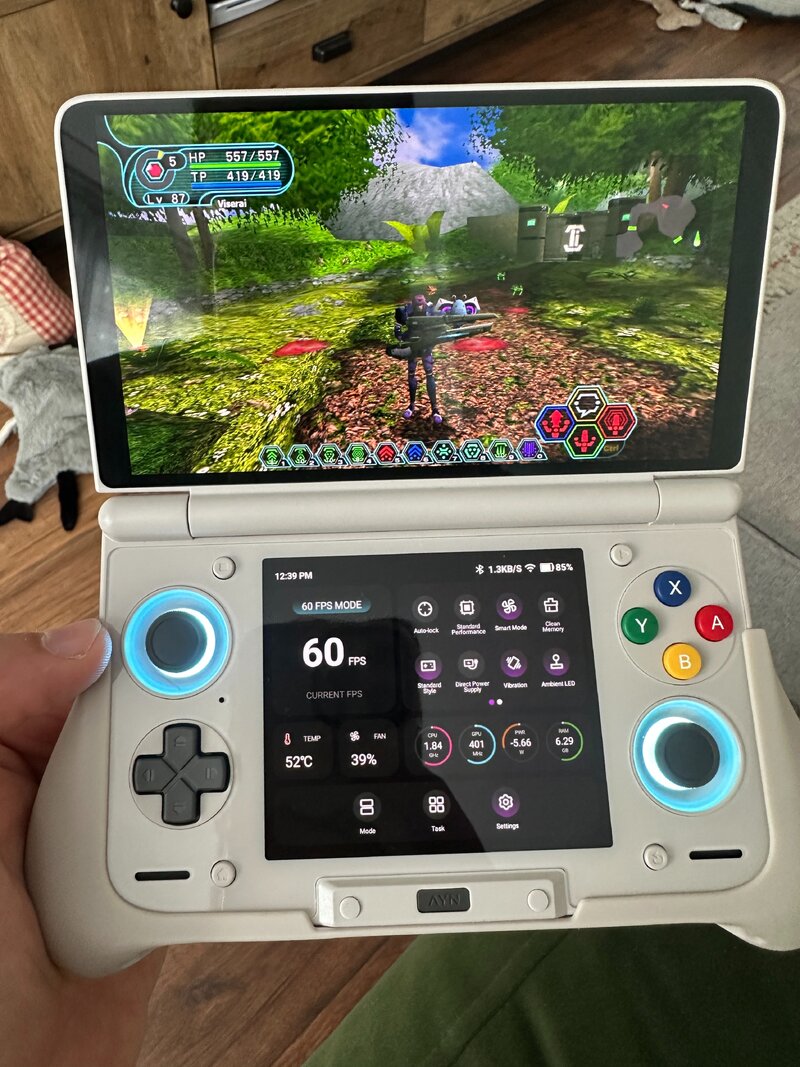
Taken a look at improving this over the past 24 hours and I think I have it almost exactly as I hoped with a couple minor caveats.

Graphics have been fine. I have remained on DXVK and used DX11 in the launcher along with 1600x900 res. Had no reason to change it as of yet as it has run perfectly. I have also been using it with cluster tune on my thor (which is an underclocker fyi) and been able to run it on large underclock in most places so far, but left it at small underclock for any more intensive areas (not tried beach yet). Honestly, performance is better than I expected.

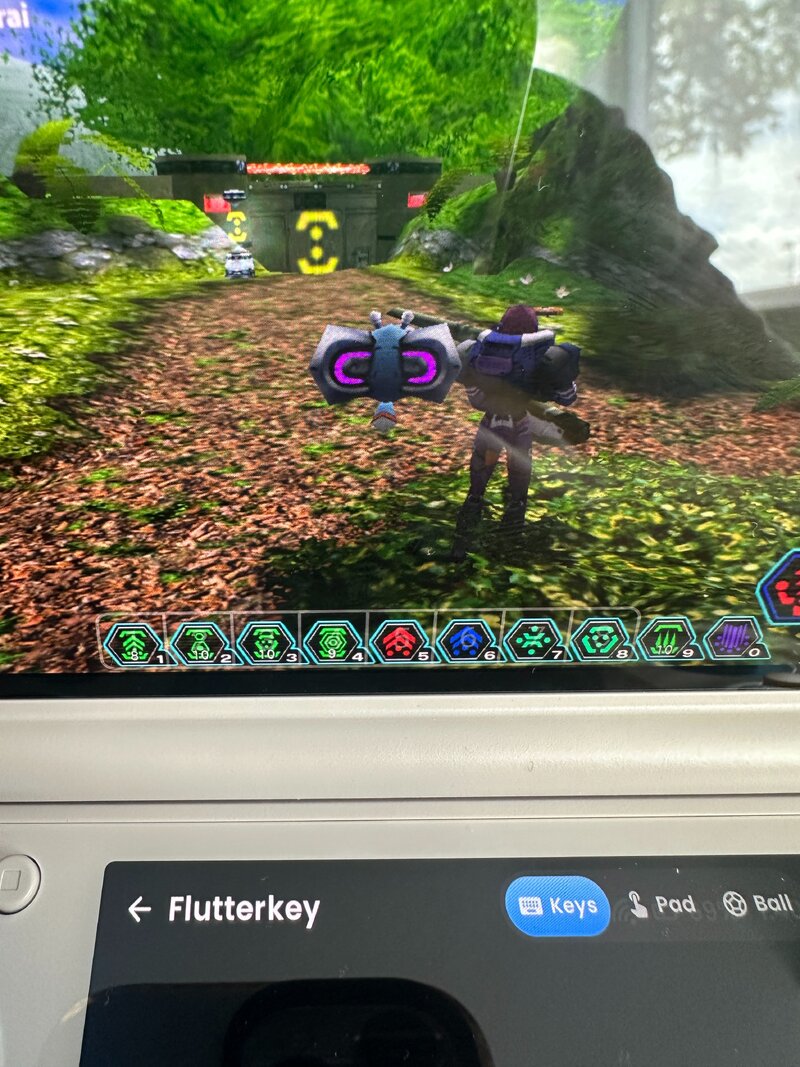
Gamepad and keyboard has been a little tricky. I set the gamepad controls in pso as per with no problem. The keyboard is not great though. Winlators keyboard is terrible. I've ended up using the built in keyboard with cocoon as it seems to input nicely. Only problem (which is mentioned in the old reddit post) is the backspace and enter keys don't work on the virtual keyboard. So I have created an input profile in winlator assigning backspace L3 and enter to R3. A bit clunky when typing, but its the best I can do without connecting a bluetooth keyboard. However, the typing itself with the cocoon keyboard is absolutely fine. Its just remembering enter and backspace are the R3 and L3 buttons as I use it. (I also assigned the spacebar to select for starting a chat)

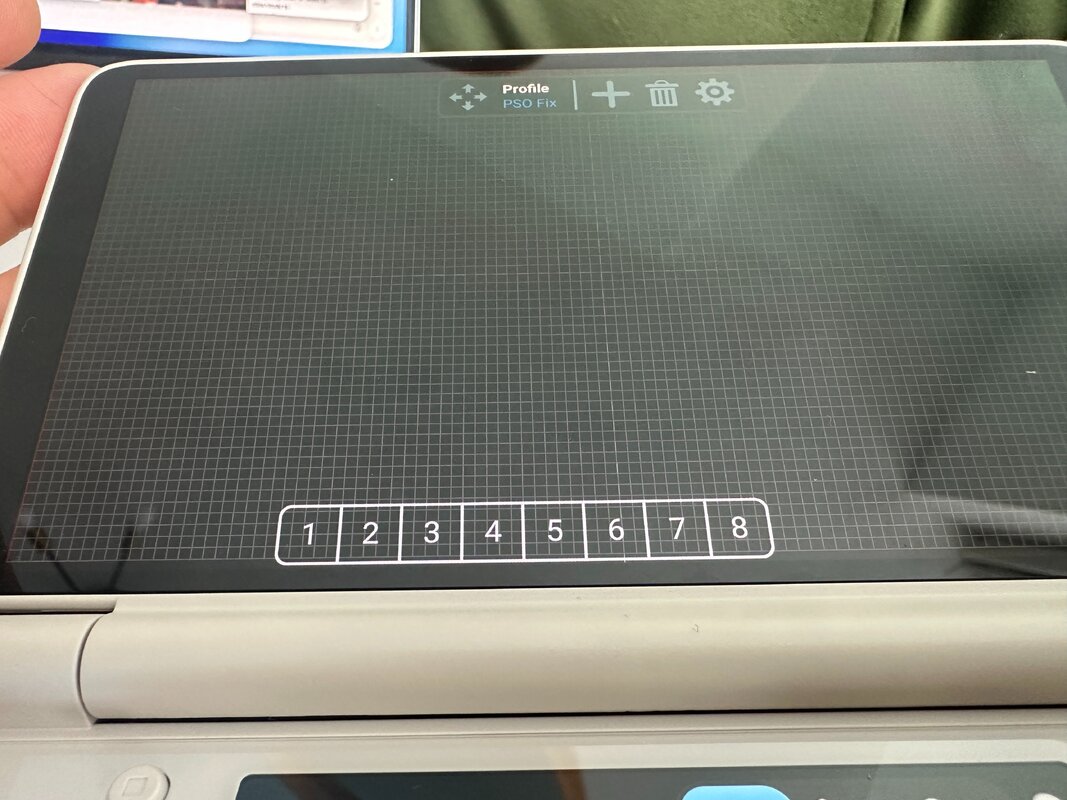
Hotkeys. The virtual keyboard is trash for hotkeys. I had to mash a number for it to sometimes work. Which is no good if you really need that Trimate. So in the same profile I created in winlator for the L3 and R3 buttons, I added an overlay. I used ranger and selected 1-9, but annoyingly you can only add up to 8 columns, so I had to settle with 1-8. Which to be honest is fine. The longest part here was going back and forth between the game and the input profile to align the overlay so it aligned perfectly with the hotkeys, essentially making the hotkeys a touchscreen feature. And I must say it works perfectly.

The only other downsides I have are that the profile isn't pinned to the container, so on launch i have to swipe from the left of the screen to initiate it. I also have to sort out the cocoon keyboard. But once that done theres no more messing about. Honestly, this is likely good enough to be my main ephinea driver from now on.

If anyone wants the input profile then I think I can export it from winlator to share here. Not sure if it will work in any version other than 10.0 though.

I hope these past couple of posts helps anyone trying to get this to work on their AYN Thor or any other android device!

edit: Just to clarify, the cocoon keyboard is called flutterkey. Not sure what to suggest using outside of the cocoon frontend.
Also, another caveat that I'm having to deal with is that Obtainium wants to track winlator and is saying there is an update. Obviously I am reluctant to update as it will more than likely break it. So I've had to change settings so it doesn't silently update etc without my permission, and I won't be able to tap "update all" anymore in obtainium. I wish there was a way to tell it not to update winlator but I'm just going to have to be careful using obtainium from now on or risk breaking my ephinea install.
 

Attachments

  • IMG_6234.JPG
    IMG_6234.JPG
    1.7 MB · Views: 7
  • IMG_6235.JPG
    IMG_6235.JPG
    1.9 MB · Views: 7
  • IMG_6236.JPG
    IMG_6236.JPG
    1.3 MB · Views: 7
Last edited:
I just recently purchased an Android tablet. It hasn't arrived yet, hopefully this week or next or... soon(tm).

May look at making some sort of easy-to-use installer/configurator for Ephinea if I have some time to mess around with it.

Perhaps there are other things I can do to make the game easier to run as well since I'll have the same platform for testing.

Not promising anything! Just saying! It COULD happen. ;)
 
Different stack, same wall - posting my results in case they're useful, since I don't think
anyone here has tried Hangover yet.

Setup
Linux handheld, not Android: MANGMI Air X (Snapdragon 662 / SM6115, Adreno 610) running
ROCKNIX. Instead of Winlator I used Hangover, which is a different approach to the same
problem - native ARM64 Wine, with only the game's x86 code emulated (box64 or FEX as a WoW64
backend) rather than emulating a whole x86 Wine.

What works
The game itself runs genuinely well. Title screen, login dialog, credentials accepted, and
PSOBB's login menu (Login / Start Game / Exit Game / Patch Download / Register UserID). The
in-game Patch Download works and updated online.exe, so Ephinea's .NET launcher isn't
needed at all - useful if anyone else is stuck on that, since the launcher is WPF and
wine-mono can't run WPF.

Rendering is wined3d over OpenGL (Adreno 610 only exposes Vulkan 1.0, so DXVK is impossible
here) and it looks correct - no missing textures, no colour problems.

One fix that might help people here
PSOBB only accepts 16-bit display modes. If the client exits or hangs before you ever
see a window, check log/error.log inside the game folder for:

Code:
Error : Can't find DisplayMode
Error : Can't use format [D3DFMT_R5G6B5]
Error : Can't use format [D3DFMT_X1R5G5B5]

On my setup Xwayland only offers 24/32-bit, so the client found no usable mode. Fixed with:

Code:
wine reg add 'HKCU\Software\Wine\X11 Driver' /v ScreenDepth /t REG_SZ /d 16 /f
wine explorer /desktop=pso,1280x720 PsoBB.exe

After that the D3D device came up as HAL-HARD and the GPU actually started clocking up. Might
be worth a look if anyone's client dies early - it's a different failure from the ones
discussed above, and it cost me a while to find.

Where I'm stuck - same place as this thread
No916
on login. Cause confirmed: ephinea.dll never initialises, so the client runs
unpatched. The title screen shows ! DLL ERROR ! exactly where EPHINEA SERVER CLIENT
v1.510 should be, and while the game is running:

Code:
grep -c ephinea /proc/<pid>/maps   ->  0

Both emulator backends fail on that DLL, in different ways:
  • box64: DllMain(PROCESS_ATTACH) is entered and never returns. ~100% CPU forever, no
    window. Wine logs EXCEPTION_INT_DIVIDE_BY_ZERO or EXCEPTION_ILLEGAL_INSTRUCTION depending on
    version.
  • FEX: DllMain faults with an ACCESS_VIOLATION inside the DLL's own mapped range, Wine
    logs "Initialization of ephinea.dll failed", and the client carries on unpatched - which is
    what produces the 916.

Tested across three Hangover releases (9.22 / 11.9 / 11.16), so three box64 generations and
two FEX generations. All fail the same two ways. Also no change from: box64 interpreter mode
(BOX64_DYNAREC=0), conservative dynarec flags (SAFEFLAGS=2, BIGBLOCK=0, CALLRET=0,
STRONGMEM=3), or Windows version set to win7/winxp.

For what it's worth, ephinea.dll looks packed - 12.6 MB with a section named .banana
plus several RWX sections, and Wine logs "disabling no-exec because of ephinea.dll". That's
the kind of code emulators tend to struggle with, which fits what this thread has been seeing.

I also tried the Winlator-shaped stack, same result
To check whether this was just a Hangover quirk, I also ran it the way Winlator does - box64
emulating a complete x86_64 Wine 11.0 (new-WoW64), rather than Hangover's native ARM64
Wine. 32-bit cmd.exe works fine through it, so the stack is sound, but ephinea.dll fails to
initialise there too. So on my hardware this isn't specific to Hangover, and it isn't specific
to a box64 version either - seven configurations now, both emulator families, both
architectures.

One new detail from that run that might interest whoever's debugging this: alongside the
illegal-instruction and access-violation errors, Wine logged EXCEPTION_SINGLE_STEP. A
single-step exception means the trap flag was set. Together with the deliberate divide-by-zero
I saw elsewhere, that suggests ephinea.dll's packer raises faults on purpose and resumes from
its own handlers - which is exactly the sort of thing emulators get subtly wrong, and would
explain why box64 hangs (handler never resumes) while FEX crashes (resumes with bad state).

Questions for the thread
  • Has anyone ever seen ephinea.dll actually initialise on ARM - i.e. the
    "EPHINEA SERVER CLIENT v1.xxx" version string showing on the title screen instead of a DLL
    error? That's the one thing I can't get, and I think it's the whole ballgame.
  • I saw the note that box64 0.2.7-0.2.9 boots the game while newer versions don't. Was that
    with standalone box64 + full x86 Wine (Winlator's setup)? Hangover uses box64 as a WoW64
    backend instead, and I get identical failures on old and new box64 there - so I suspect the
    two paths behave differently.
  • On the services.exe / winedevice.exe freeze: is there a documented workaround? I noticed
    winedevice.exe burning CPU early on and didn't chase it.

Happy to run tests - the handheld has SSH and I can try any config, env var or build and
report back with logs.

 
Last edited:
I just recently purchased an Android tablet. It hasn't arrived yet, hopefully this week or next or... soon(tm).

May look at making some sort of easy-to-use installer/configurator for Ephinea if I have some time to mess around with it.

Perhaps there are other things I can do to make the game easier to run as well since I'll have the same platform for testing.

Not promising anything! Just saying! It COULD happen. ;)
perhaps you could support xinput on win7, since both linux and android stacks that run ephinea use win7 compat mode generally and you block that (or did) and fallback to dinput for win7 and lower. that would help overall compatibility and stop controller overrides having to be written

but if you come up with some cool stuff would be fun to see for sure!
 
Last edited:
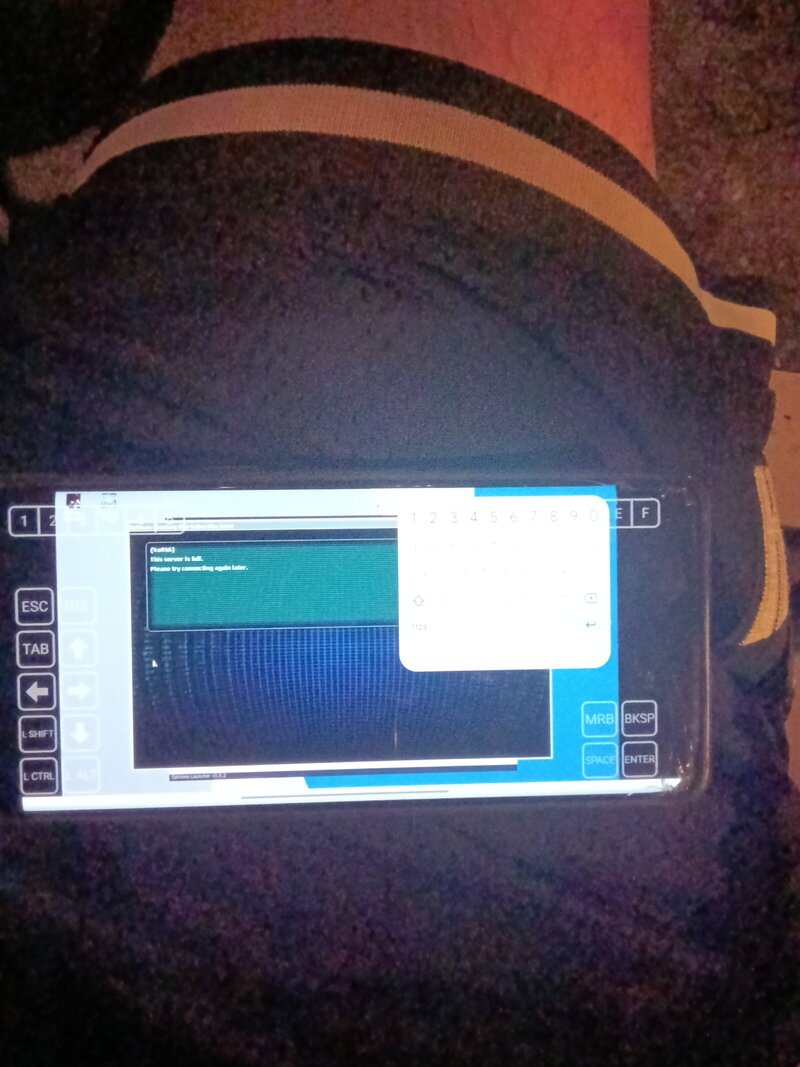
Well I'm getting 916 server full issue not sure if my job is done and waiting to get a spot online but I switched. A certain thing to wine and wala! If anyone needs help I can send screenshots using a oneplus 8 snapdragon 865 8gb ram gnite
 

Attachments

  • 17885949363448126359716923561138.jpg
    17885949363448126359716923561138.jpg
    645.5 KB · Views: 1
Back
Top