Controller Inputs Not Detected In-game | CachyOS

fenmore

Member
Gender
Male
Guildcard
42004780
I can't for the life of me figure this out.

Running CachyOS with hyprland. Ephinea was installed through Steam via Proton 10.0-4. Other Proton versions either cause PSO to crash upon launch, or have the same input issue.

I've also tried using the linux installer from Zeroz, same issue. The lutris installer doesn't work at all.

Steam Input is enabled. My controller is detected and works through Steam itself, and in every other game. The only change to my controller config is binding 1-8 to my DPAD.

Disabling Steam Input does NOT solve this, controller inputs still aren't detected.

When in-game, the normal controller inputs aren't detected at all, however the 1-8 inputs on the DPAD work normally. Mouse inputs are also detected through the steam overlay for some reason.

I've uploaded a video to demonstrate all this as well.

I'm lost. Anyone have ideas?

Edit: Wanted to add that neither the steam-devices-git or game-devices-udev packages helped.
 
Last edited:
Try enabling the AUTO DETECT ACTIVE GAMEPAD option in the launcher's options. It's on the third page or so.

The game is old and uses whatever is seen as the first controller from DInput. That option allows using any of the four that the game sees and switches to one that's active based on button presses.
 
Try enabling the AUTO DETECT ACTIVE GAMEPAD option in the launcher's options. It's on the third page or so.

The game is old and uses whatever is seen as the first controller from DInput. That option allows using any of the four that the game sees and switches to one that's active based on button presses.
I've tried that to no avail as well unfortunately.. The suggestion is appreciated regardless. I've also tried using a multitude of different controllers. Xbox, two different third party xbox controllers, a dualsense controller, and a steam controller.. Same result with all of them.
 
Did you try the USE XINPUT option with and without steam input?
I did indeed. Pretty much any combination of settings within the launcher and steam related to controllers, I've tried.

Edit: I've also tried the Proton 11 Beta that was released today, and tried using protontricks to set the container to Windows 8 and 10 (currently using 7). I swear i've done my due diligence here :')
 
Last edited:
To start, I am only a Linux part timer, so I do not have all the info on how or why.
I just tested myself installing PSOBB on CachyOS and I can confirm that with the right version of Lutris with the right settings, it will install and controller worked for me though Lutris out of the box.

To do this I first uninstalled any Lutris install I had and then did these steps:
1) Open Shelly, go to Settings at the bottom left. Slide the Enable Flatpak option.
2) Type password and enter. Wait for Flatpak to install.
3) In Shelly, go to the FLATPAK tab, then go to Install. Search Lutris. Click and Install. (This may take awhile to install)
4) Restart
5) Launch Lutris. Go to the bottom left under Runners and hover over Wine, then click the cogwheel.
6) Change Wine version to System (11.0)
7) From here you can follow this guide: Ephinea PSO BB on Steam Deck (Official Thread)

  1. Open Lutris, click the + icon in the top left, click Search the Lutris website for installers, search for Phantasy Star Online: Blue Burst, then click Install on the option named Ephinea plus addon plugin.
  2. Click Install, choose your installation directory, and then Install again. Let the installer finish.
  3. (Optional, recommended) After installing the game, right-click the game in Lutris and click Create Steam shortcut to add it to Steam for gaming mode.
  4. When you open the game for the first time, you may be asked to install Mono and Gecko, click Install, do not refuse.

Ephinea (and addons) should now be installed and controller should work out of the box.
 
To start, I am only a Linux part timer, so I do not have all the info on how or why.
I just tested myself installing PSOBB on CachyOS and I can confirm that with the right version of Lutris with the right settings, it will install and controller worked for me though Lutris out of the box.

To do this I first uninstalled any Lutris install I had and then did these steps:
1) Open Shelly, go to Settings at the bottom left. Slide the Enable Flatpak option.
2) Type password and enter. Wait for Flatpak to install.
3) In Shelly, go to the FLATPAK tab, then go to Install. Search Lutris. Click and Install. (This may take awhile to install)
4) Restart
5) Launch Lutris. Go to the bottom left under Runners and hover over Wine, then click the cogwheel.
6) Change Wine version to System (11.0)
7) From here you can follow this guide: Ephinea PSO BB on Steam Deck (Official Thread)


Ephinea (and addons) should now be installed and controller should work out of the box.
Lutris is what i used previously to install PSO and had a good experience with. Roughly 2-3 months ago that install of PSO inexplicably stopped working (and i've come across other posts online mentioning this as well)

I did have Lutris installed via flatpak already. The issue recently is that regardless of which Ephinea installer i choose in Lutris (with or without lua addons), the script will download the .exe installer for ephinea but won't actually run it. The proper directories get created but they remain empty. I've tried copying a working install from Windows over to it, and a separate proton install with no luck - the game crashes

That same problem occurred in Lutris installed via Flatpak, and via pacman.

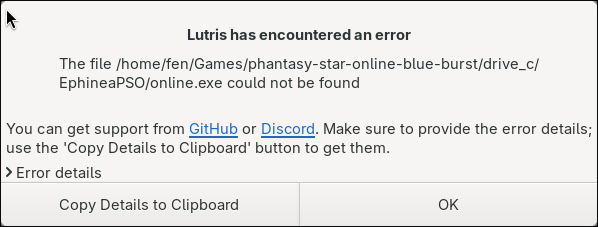
I just uninstalled and reinstalled Lutris through Flatpak, followed your steps, and ran into the same issue mentioned above. The .exe does not actually install and i get a prompt that the files don't exist to launch the game..

psolutris.png
 
Lutris is what i used previously to install PSO and had a good experience with. Roughly 2-3 months ago that install of PSO inexplicably stopped working (and i've come across other posts online mentioning this as well)

I did have Lutris installed via flatpak already. The issue recently is that regardless of which Ephinea installer i choose in Lutris (with or without lua addons), the script will download the .exe installer for ephinea but won't actually run it. The proper directories get created but they remain empty. I've tried copying a working install from Windows over to it, and a separate proton install with no luck - the game crashes

That same problem occurred in Lutris installed via Flatpak, and via pacman.

I just uninstalled and reinstalled Lutris through Flatpak. followed your steps, and ran into the same issue mentioned above. The .exe does not actually install and i get a prompt that the files don't exist to launch the game..

View attachment 26025
I ran into that issue too, which is what changing Wine version to System (11.0) should have resolved, once I did that it installed the game's exe.
I am sorry if it did not work for you, I am unsure why.
 
I ran into that issue too, which is what changing Wine version to System (11.0) should have resolved, once I did that it installed the game's exe.
I am sorry if it did not work for you, I am unsure why.
I really appreciate you guys trying to help either way.

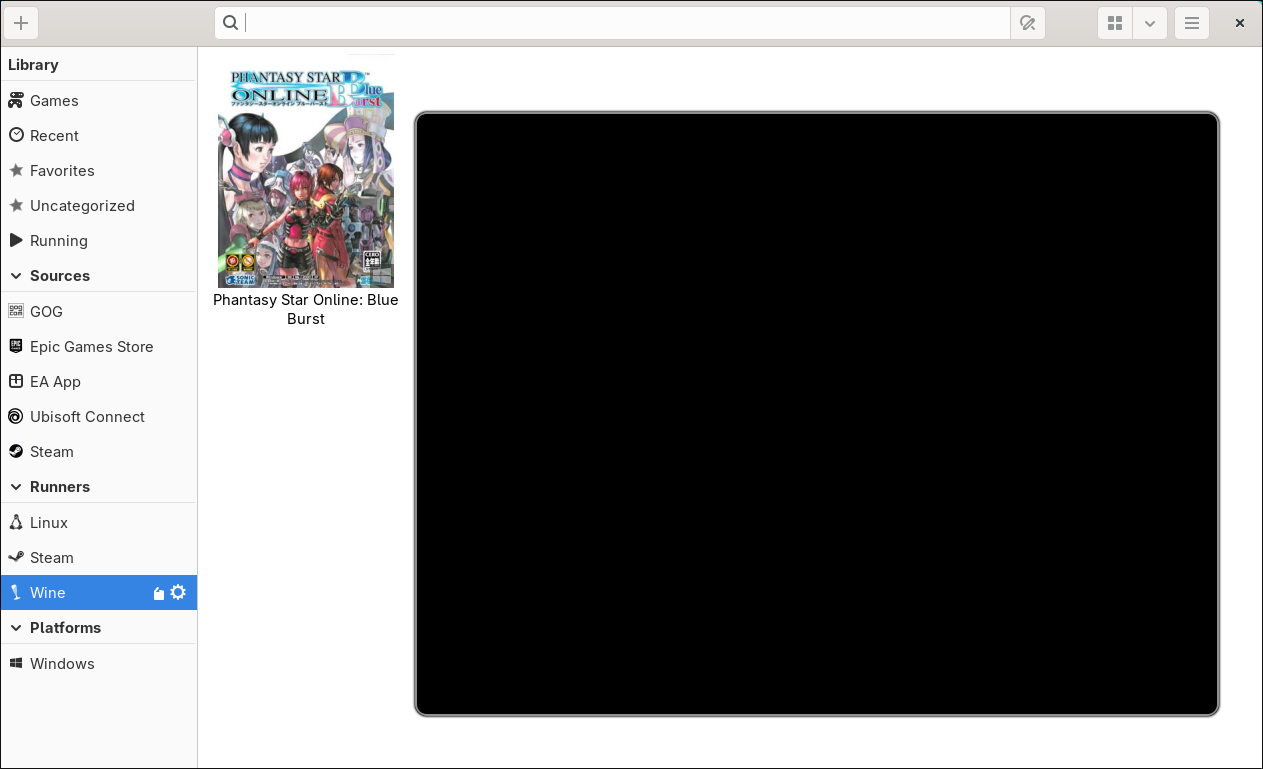
I repeated the steps again for shits and... well it's progress I suppose, though a step backwards from the proton install. Just a black screen for the launcher. As much as I don't want to quit PSO, there may be an indefinite break in my near future here.psolutris2.png
 
I did indeed. Pretty much any combination of settings within the launcher and steam related to controllers, I've tried.

Edit: I've also tried the Proton 11 Beta that was released today, and tried using protontricks to set the container to Windows 8 and 10 (currently using 7). I swear i've done my due diligence here :')
So the only issues I can think of (specific to PSOBB)...
1. You have more than 4 gamepad type devices that DInput8 is seeing, so PSOBB isn't actually checking your device. If you have other controllers/bluetooth stuff connected that's not your mouse or keyboard, might be worth unplugging them.
2. DInput8 is just not working on your system. The 'USE XINPUT' option should workaround this if your emulation environment is Win8 or higher.

Otherwise, I have no idea. I don't have a Linux system to test but disabling both of those launcher options should give you the 'vanilla' game behavior, so it's not necessarily something we broke.
 
So the only issues I can think of (specific to PSOBB)...
1. You have more than 4 gamepad type devices that DInput8 is seeing, so PSOBB isn't actually checking your device. If you have other controllers/bluetooth stuff connected that's not your mouse or keyboard, might be worth unplugging them.
2. DInput8 is just not working on your system. The 'USE XINPUT' option should workaround this if your emulation environment is Win8 or higher.

Otherwise, I have no idea. I don't have a Linux system to test but disabling both of those launcher options should give you the 'vanilla' game behavior, so it's not necessarily something we broke.
I do have more than 4 gamepad devices, however only 2 had ever been connected to this PC prior to this issue coming up. I tested more of them afterwards.

By no means do i think this was broke by you guys either, I'm fairly confident it's something wonky with my configuration somehow.

It's strange as hell. I'll keep messing with it over the next few days and update this thread if I come across anything. I just wanna keep playing my janky gear farming game y'know :')

Thank you guys again for the help up to this point.
 
Best of luck figuring it out, if I come across anything else that might help I will let you know. Hoping you can join us again on PSO soon.
 
Back
Top