Game Crashin

Guildcard
3
I will try to traduct correctly, im french !

My problem is sometimes my game crash, the screen just freeze, but i can heard but character move, but i cant do nothing because the screen is frozen, happening maybe 2-3 times a day ! i need to close the game entirely and restart it to continue playing

My Config (dont think this is my config the problem)

Amd Ryzen 7 9800x3d
Gpu 5080
32gb ram ddr5
windows11
 
Is this relevant to your crashing?
Q. My game crashes when I shoot a gun or when someone in the party performs a Photon Blast.
A. Change your Windows Operating System’s Data Execution Prevention settings. You can find your current setting by going to the Windows Control Panel -> System -> Advanced System Settings -> “Performance” Settings -> “Data Execution Prevention” tab.


Select “Turn on DEP for essential Windows programs and services only” or add an exception for Ephinea’s PsoBB.exe
If it is not that, are you perhaps using custom textures in game?


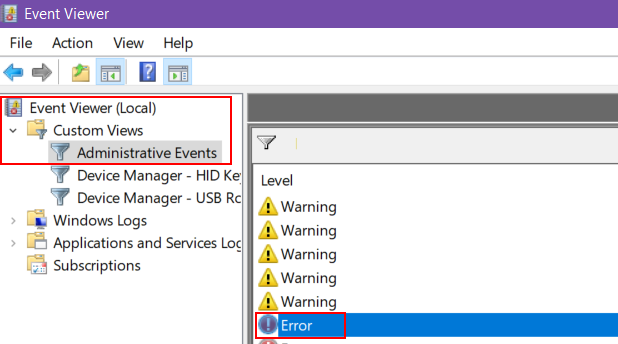
If the first thing quoted does not help, I recommend a fresh install and if you still crash, to further debug this I would need you to go to the Program Event Viewer in Windows, find when PSOBB failed and post only the Exception code, Fault offset, and the final component of the Faulting module path.

The post should look like this when replying:
Exception code: 0xc0000005
Fault offset: 0x004f840e
psobb.exe
 
Is this relevant to your crashing?

If it is not that, are you perhaps using custom textures in game?


If the first thing quoted does not help, I recommend a fresh install and if you still crash, to further debug this I would need you to go to the Program Event Viewer in Windows, find when PSOBB failed and post only the Exception code, Fault offset, and the final component of the Faulting module path.

The post should look like this when replying:
And how i can see the execution code ?
 
Capture d’écran 2026-04-29 130351.png
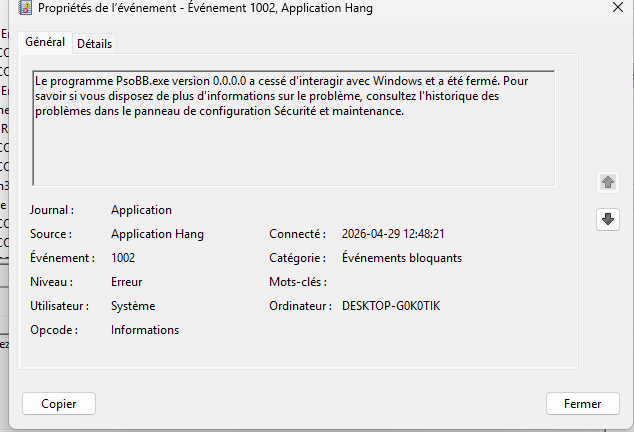
i got this and on details i got this


Nom du journal :Application
Source : Application Hang
Date : 2026-04-29 12:48:21
ID de l’événement :1002
Catégorie de la tâche :Événements bloquants
Niveau : Erreur
Mots clés :
Utilisateur : Système
Ordinateur : DESKTOP-G0K0TIK
Description :
Le programme PsoBB.exe version 0.0.0.0 a cessé d'interagir avec Windows et a été fermé. Pour savoir si vous disposez de plus d'informations sur le problème, consultez l'historique des problèmes dans le panneau de configuration Sécurité et maintenance.

XML de l’événement :
<Event xmlns="http://schemas.microsoft.com/win/2004/08/events/event">
<System>
<Provider Name="Application Hang" Guid="{c631c3dc-c676-59e4-2db3-5c0af00f9675}" />
<EventID>1002</EventID>
<Version>0</Version>
<Level>2</Level>
<Task>101</Task>
<Opcode>0</Opcode>
<Keywords>0x8000000000000000</Keywords>
<TimeCreated SystemTime="2026-04-29T16:48:21.1596729Z" />
<EventRecordID>16227</EventRecordID>
<Correlation />
<Execution ProcessID="4028" ThreadID="15300" />
<Channel>Application</Channel>
<Computer>DESKTOP-G0K0TIK</Computer>
<Security UserID="S-1-5-18" />
</System>
<EventData>
<Data Name="AppName">PsoBB.exe</Data>
<Data Name="AppVersion">0.0.0.0</Data>
<Data Name="ProcessId">0x4f60</Data>
<Data Name="StartTime">0x1dcd7e305b3709c</Data>
<Data Name="TerminationTime">4294967295</Data>
<Data Name="ExeFileName">C:\Users\ADMIN\EphineaPSO\PsoBB.exe</Data>
<Data Name="ReportId">eca4507b-eebc-445d-8df2-8b7c63006b3f</Data>
<Data Name="PackageFullName">
</Data>
<Data Name="PackageRelativeAppId">
</Data>
<Data Name="HangType">Cross-thread;Top level window is idle</Data>
</EventData>
</Event>

 
yep i was on direct 12 i put it on 11 and i got some lag like if im in slow mode i will let in in 11 if that not reproduce
If 11 causes lag, just go to 9. You'll lose the ability to lock your screen or respond to full screen UAC prompts while playing the game, though. Also, screensavers will crash the game, but it'll probably be more stable in your situation.

You could try Vulkan too and see what it do, but yeah... That D3D12 freeze is an issue for some. I need to work on adding an option to use a newer version of the dgVoodoo DLL files and see if that also resolves issues for some.

I'MMA GET ON IT.
 
Back
Top