
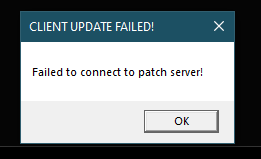
Cant update through launcher / Failed to connect to patch server

Aurelea

Member
Hello, Returning boomer

I can but cannot access the game because of the screenshot provided, "can" because it still let me boot up the game and was able to hit patch download in there which changed the launcher from 3.5.1 to 3.5.2 but the launcher itself is still giving me the same error, when I bootup the game and attempt to login it says the client is too old and I need to run the launcher to fully update it thus we are back at square one.

After some research of others running into similar issues I have made sure ephinea is installed in my users folder (the installers default location), added the entire folder as an exception in windows defender, ran things as administrator, temp disabled defender, installed net framework 4.8.1 (specifically targeting 4.6.2 just says something better is installed) but still nothing seems to be working so im currently at a loss as to what to do

Im on windows 10 22H2
 

Attachments

  • Capture.PNG
    Capture.PNG
    2.5 KB · Views: 3
Depending on where you live, it could be your ISP or location that's causing the issue. You could try using a VPN and see if you get a different result.
 
Just wanted to update that using a VPN worked and let the launcher update the game and thus allowed me access to the game.

The strange thing is though I dont need the VPN running to login into the game, only to just allow the launcher to update the game which is super weird, wish I knew why this was the case.
 
Just wanted to update that using a VPN worked and let the launcher update the game and thus allowed me access to the game.

The strange thing is though I dont need the VPN running to login into the game, only to just allow the launcher to update the game which is super weird, wish I knew why this was the case.
I have no idea on this either. Perhaps your ISP or your own device is blocking outgoing to port 9000 to our IP address. (Did you accidentally hit "block" at an initial Windows Firewall prompt when first launching the client? Or do you have your Windows Firewall set up to block outgoing connections unless otherwise specifically allowed?)

When your connection is going through the VPN, all traffic goes through the VPN outgoing port (even when you're targeting other ports and other IPs), so it has no issue.
 
I have no idea on this either. Perhaps your ISP or your own device is blocking outgoing to port 9000 to our IP address. (Did you accidentally hit "block" at an initial Windows Firewall prompt when first launching the client? Or do you have your Windows Firewall set up to block outgoing connections unless otherwise specifically allowed?)

When your connection is going through the VPN, all traffic goes through the VPN outgoing port (even when you're targeting other ports and other IPs), so it has no issue.
I have never touched windows firewall at all, it always been whatever default settings its given on a fresh windows install or perhaps maybe the people that assembled this PC (its a premade) messed with it? no idea and no way to tell if they did.

Very few things have ever given me the windows firewall prompt and when I do I allow them every time, since I just recently came back im 99.9% sure there was no prompt for this at any point, though if there were and in the off chance I hit the wrong thing, where would I check and rectify this?
 
I have never touched windows firewall at all, it always been whatever default settings its given on a fresh windows install or perhaps maybe the people that assembled this PC (its a premade) messed with it? no idea and no way to tell if they did.

Very few things have ever given me the windows firewall prompt and when I do I allow them every time, since I just recently came back im 99.9% sure there was no prompt for this at any point, though if there were and in the off chance I hit the wrong thing, where would I check and rectify this?

To access your firewall:
Code:
Open Control Panel.
Click on System and Security.
Click on Windows Firewall.


If you wish to restore your firewall settings to default:
Code:
On the left pane, click the Restore defaults link.
Click the Restore defaults button.
Click Yes to confirm.
 
Back
Top